Social Login Settings
Social Login Settings
The Stack Console's Social Login Settings tab allows you to add new social login (e.g., Google, Facebook, GitHub) credentials by entering the client ID, client secret, and setting the status to active or inactive.
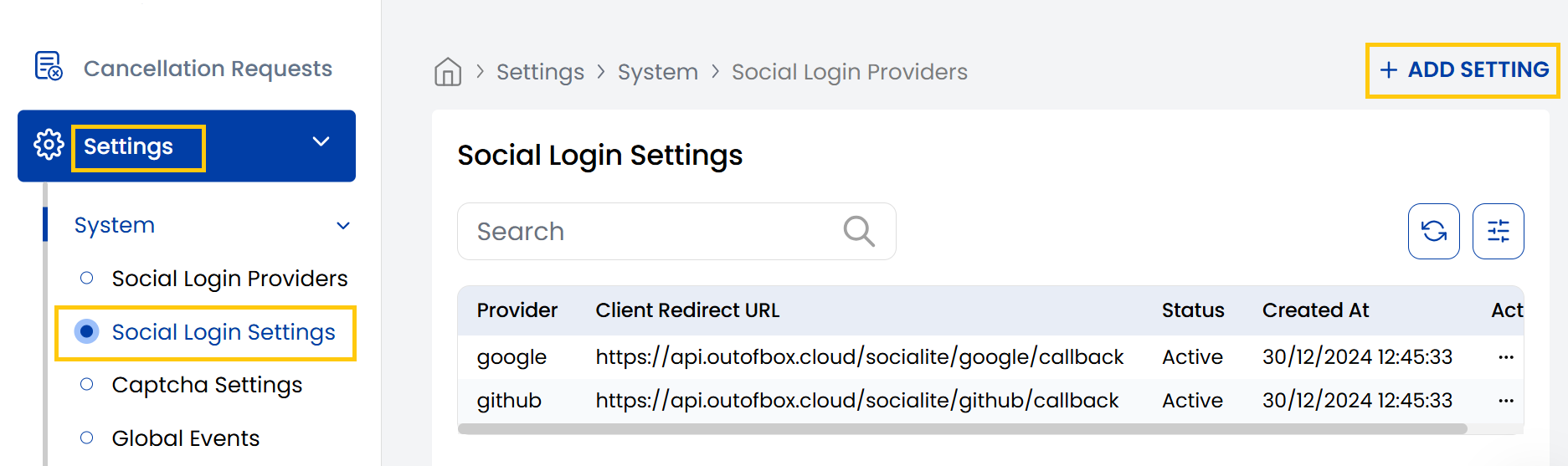
- From the left-hand side menu, navigate to the Settings tab. Under Settings, select the System option and click on Social Login Settings.
- The Social Login Settings page displays the available social platforms created for users.
- To create new social login click on Add Setting.
- Select Provider (e.g., Google, Facebook, LinkedIn) and fill up the client information:
- Client ID: A public identifier of your application, obtained from provider's developer console.
- Client Secret: A secret known only to the app and the authorization server.
- Set the status as active or inactive and click on Submit.
Conclusion
The Social Login Settings section enables secure integration of third-party authentication providers. For setup assistance, contact Stack Console support.